I Love The Smiths AI Video Generator
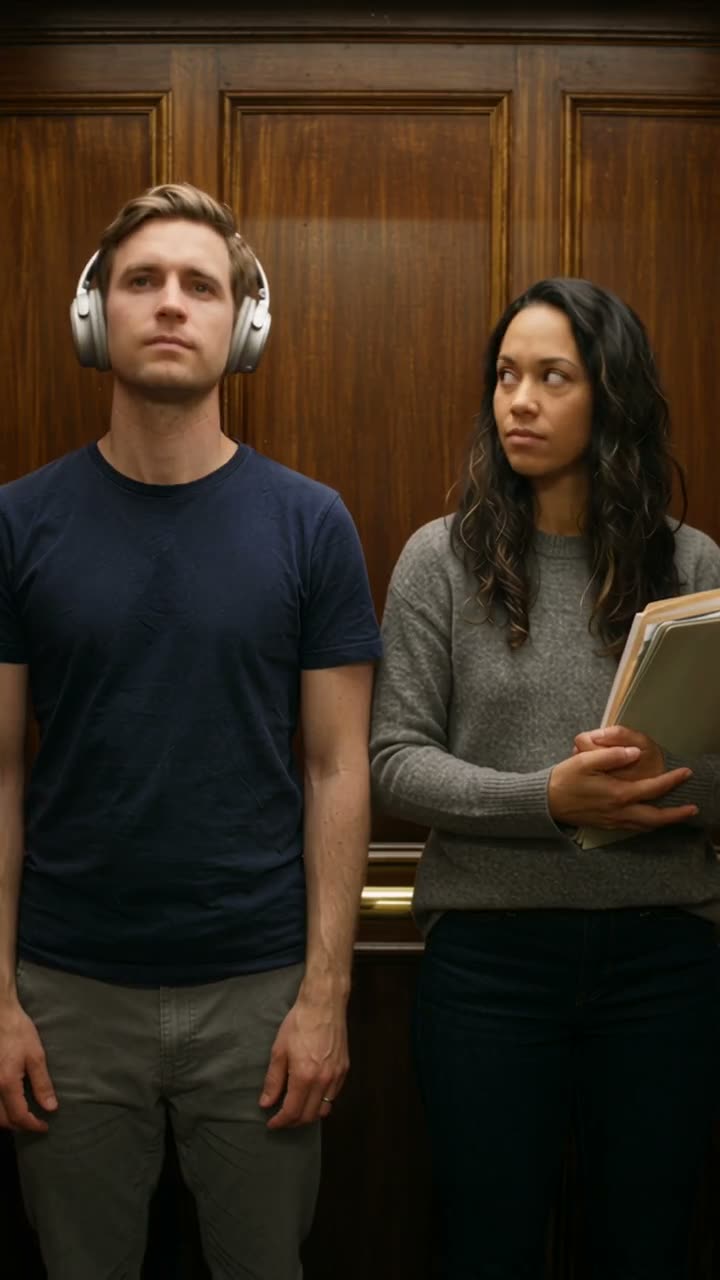
Turn two photos into the viral elevator moment. One of you wears headphones, the other leans in and says "I love the Smiths," says it again, then steps out as the doors close. Upload you and a friend or partner and get a vertical clip of about 15 seconds, ready for TikTok, Reels and Shorts. No filming, no editing.
 ELEVATOR MEME
What your photos become
2 photos → 15s · 9:16 · Watermark-free MP4
Original audio precisely synced
Photo 1 → lead · Photo 2 → partner. One subject per photo.
Photos are auto-deleted after 7 days.
By uploading, you confirm this is a photo of you or of someone who gave you permission, and that it contains no nudity or sexual content. Content Policy
Pay $9.90 for 50 credits. This video uses 25; about 25 remain.







Preview footage helps you explore this scene. Its source and how it was made may vary by template.

Original Audio Precisely Synced
Every MP4 includes the original scene sound precisely synchronized with the action. No manual soundtrack editing.
No Subscription Required
Pay-as-you-go passes from $9.90. Credits never expire.
15-second clip
Upload 2 photos. Length follows the template reference. Watermark-free MP4.
Failed render? Credits come back
If a generation fails or is blocked by safety checks, its credits return to your balance automatically.
The Elevator Moment, Made With AI
Two photos in, one vertical clip out.
The Classic Encounter
Two People
Loved the elevator scene? Try another two-photo trend next.
Bicep Heart AI Video Generator →Where the "I Love The Smiths" Meme Came From
Origin
The elevator scene in the film (500) Days of Summer, where one character hears the other's headphones and says "I love the Smiths."
Revival
A TikTok remake by @hanan.selini brought the scene back, and couples, friends and coworkers started recreating it.
Spread
Several AI template sites added two-photo elevator templates.
AI Remix
With TrendSwap, two photos become the full scene as a vertical clip, with no editing.
Why TrendSwap
Two photos in, one vertical clip out.
The whole beat in one clip: headphones, the line, the repeat, the exit, the doors closing.
Made in 9:16 vertical for TikTok, Reels and Shorts.
Comes with sound, synced to the scene. Download and post as is.
Captions to post with it
Sound is already in the clip: pick a caption, paste it and post.
🎧 They said "I love the Smiths" and I froze 😳 who else? #ilovethesmiths
🛗 Every elevator ride with my office crush, honestly 💼😅 #elevatormeme
🎶 When someone finally gets your music taste 🫶 #ilovethesmiths
#ilovethesmiths #elevatorscene #500daysofsummer #aivideo #trendswap
How It Works
Step 1
Upload two clear photos: who wears the headphones and who says the line.
Step 2
Tap generate. You get a 9:16 vertical clip of about 15 seconds.
Step 3
Download and post to TikTok, Reels or Shorts.
Photo Checklist
1 Subject
One person per photo, waist up.
2 Angle
Face the camera; no sunglasses, masks or hands over the face.
3 Light
Even light; avoid strong backlight.
What You Bring, What You Get
What You Bring
2 photos, one per person.
What You Receive
A 9:16 vertical elevator-scene video of about 15 seconds, ready for TikTok, Reels and Shorts.
YOUR PLACE IN THE VIRAL SCENE
This studio uses your photo to create a high-definition video recreation. The lead person changes; the scene, movement, and soundtrack guide the finished clip. Results can vary, so review your video before sharing.
A pack pays for video creation at your selected resolution. Buying a pack does not grant rights to the music or an endorsement from the original artist.
Use your own photo or an adult’s photo with their permission. Do not use the result to impersonate someone or mislead viewers.
YOUR PHOTOS STAY YOURS
What happens to an upload on this page.
You choose when to upload
Selecting a photo previews it on your device. Clicking the creation button uploads it so your saved photo can continue through sign-in and checkout.
Saved to your account
Your portrait is used to create your video. Your personal uploads are not displayed in the community showcase.
Control your video history
Remove a finished or failed video and its saved files from My videos. Temporary files are automatically purged after 30 days.
1–2 PHOTOS INREADY-TO-POST OUT
Pay Once or Subscribe with Savings
Credits never expire on one-time passes, or save up to 17% with subscriptions. Cancel anytime.
Single
- ✓480p & 720p HD exports (up to 720p max)
- ✓Template motion, no watermark
- ✓Credits never expire
- ✓Failed jobs return the credits used
Creator
- ✓Unlocks 1080p Full HD (100 cr), 720p (50 cr) & 480p (25 cr)
- ✓Template motion, no watermark
- ✓Credits never expire
- ✓Failed jobs return the credits used
Studio
- ✓Full 1080p Pro (100 cr), 720p (50 cr) & 480p (25 cr) access
- ✓Template motion, no watermark
- ✓Credits never expire
- ✓Failed jobs return the credits used
Stripe Bank-Grade Security
Apple Pay, Google Pay & cards. Zero raw card numbers stored.
Failed Jobs Return Credits
Render timeout or safety block? Credits are returned automatically when the job is marked failed.
Business-day Support
support@trendswap.app · Contact us with your order or video reference.
Frequently Asked Questions
What is the I Love The Smiths trend?
[+][-]
A remake of a famous elevator scene: one person wears headphones, the other says "I love the Smiths," then leaves as the doors close.
How many photos do I need?
[+][-]
Two: one for the person in headphones, one for the person who says the line.
How long is the video?
[+][-]
About 15 seconds.
What format is it?
[+][-]
9:16 vertical, made for TikTok, Reels and Shorts.
Do I need headphones in my photo?
[+][-]
No, the scene adds them.
Does the video have sound?
[+][-]
Yes. The clip comes with sound, synced to the scene.
What's new on this page
- Page published.