Christmas Dance AI Video Generator
Make a Christmas pajama dance with your favorite partner, or explore a playful pet duo. Choose a video first: its dance moves guide your generation. Then add the photos requested by your selected setup and review the settings before you start.
 CHRISTMAS DUO
What your photos become
2 photos → 14.35s · 9:16 · Watermark-free MP4
Original audio precisely synced
Photo 1 → lead · Photo 2 → partner. One subject per photo.
1. LEFT DANCER
Dancer on the left
2. RIGHT DANCER
Dancer on the right
Photos are auto-deleted after 7 days.
By uploading, you confirm this is a photo of you or of someone who gave you permission, and that it contains no nudity or sexual content. Content Policy
Pay $9.90 for 50 credits. This video uses 25; about 25 remain.







Preview footage helps you explore this scene. Its source and how it was made may vary by template.

Original Audio Precisely Synced
Every MP4 includes the original scene sound precisely synchronized with the action. No manual soundtrack editing.
No Subscription Required
Pay-as-you-go passes from $9.90. Credits never expire.
About 12–14 seconds
Upload 2 photos. Length follows the template reference. Watermark-free MP4.
Failed render? Credits come back
If a generation fails or is blocked by safety checks, its credits return to your balance automatically.
Choose the Video That Guides Your Dance
Each option has its own movement reference. Choose one before adding your photos.
Christmas Pajama Duo
Human duo
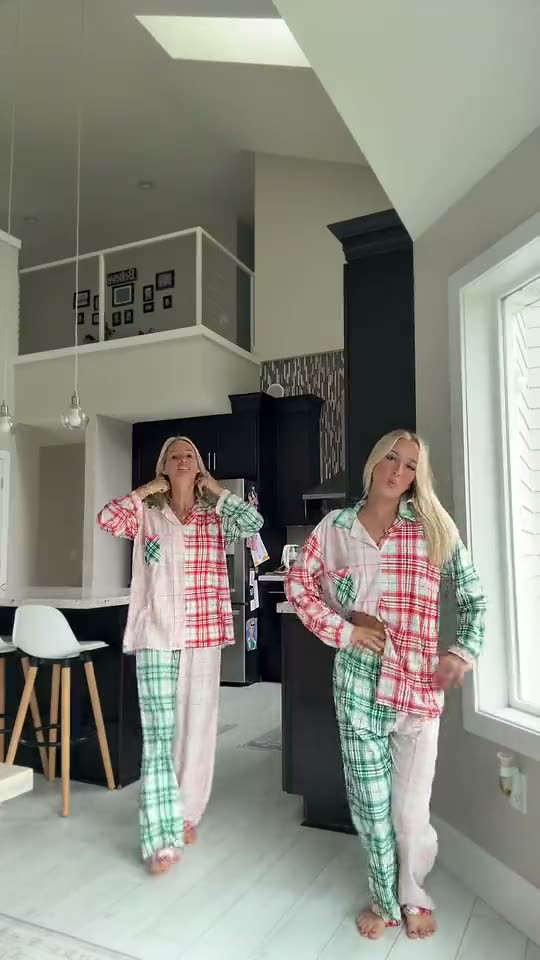
Two dancers in matching festive pajamas, side by side in a bright kitchen.
Christmas Pet Duo
Pet duo
Two kittens stand side by side on a festive stage, with Christmas trees and colored lights behind them.
Keep the holiday fun going with another photo-to-dance idea.
What Is the Christmas Pajama Duo Dance?
This Christmas dance idea puts two dancers side by side in festive pajamas. The human example shows a kitchen duet; the pet example shows two kittens on a Christmas stage. They are separate videos with separate movement references, so choose the version you want before generating.
Why TrendSwap
Pick the video, then bring your duo.
Pick the duet or pet video; that selection supplies the movement reference for your task.
Preview the selected video and review the export settings before you start.
Play your finished result and check the rhythm before downloading.
Your Duo, Your Christmas Caption
Review the full result with the audio setting you selected, then add your own caption.
Who is joining my Christmas pajama dance? 🎄 Tag your dance partner.
Our out-of-office message has choreography now. 🎄💃
The cats booked the Christmas party stage before we did. 🐈🎄
#ChristmasDance #ChristmasPajamas #AIDance #PetDance
How It Works
Choose a Video
Select the pajama duo or the pet duo. The video you choose becomes the movement reference for your generation.
Add Photos and Review
Fill the photo slots for your selected video. Check the selected preview, available output settings and displayed cost before generating.
Preview and Download
Review both dancers and the timing in the finished clip, including sound if enabled, then download.
Photo Checklist
Subject
Prepare one clearly visible subject per photo. For the pet option, show the pet's face, ears and body.
Angle
Avoid covered faces, heavy motion blur and extreme side angles. Keep room around the head and shoulders.
Light
Use sharp, evenly lit photos. Similar lighting helps the two subjects fit together.
Check Your Video
If the preview is not the dance you want, change the selected video before generating.
What You Bring, What You Get
What You Bring
The selected dance video plus the photos requested by its setup.
What You Receive
A generated dance guided by that selected video's movement reference, using the studio settings you confirmed.
YOUR PLACE IN THE VIRAL SCENE
This studio uses your photo to create a high-definition video recreation. The lead person changes; the scene, movement, and soundtrack guide the finished clip. Results can vary, so review your video before sharing.
A pack pays for video creation at your selected resolution. Buying a pack does not grant rights to the music or an endorsement from the original artist.
Use your own photo or an adult’s photo with their permission. Do not use the result to impersonate someone or mislead viewers.
YOUR PHOTOS STAY YOURS
What happens to an upload on this page.
You choose when to upload
Selecting a photo previews it on your device. Clicking the creation button uploads it so your saved photo can continue through sign-in and checkout.
Saved to your account
Your portrait is used to create your video. Your personal uploads are not displayed in the community showcase.
Control your video history
Remove a finished or failed video and its saved files from My videos. Temporary files are automatically purged after 30 days.
1–2 PHOTOS INREADY-TO-POST OUT
Pay Once or Subscribe with Savings
Credits never expire on one-time passes, or save up to 17% with subscriptions. Cancel anytime.
Single
- ✓480p & 720p HD exports (up to 720p max)
- ✓Template motion, no watermark
- ✓Credits never expire
- ✓Failed jobs return the credits used
Creator
- ✓Unlocks 1080p Full HD (100 cr), 720p (50 cr) & 480p (25 cr)
- ✓Template motion, no watermark
- ✓Credits never expire
- ✓Failed jobs return the credits used
Studio
- ✓Full 1080p Pro (100 cr), 720p (50 cr) & 480p (25 cr) access
- ✓Template motion, no watermark
- ✓Credits never expire
- ✓Failed jobs return the credits used
Stripe Bank-Grade Security
Apple Pay, Google Pay & cards. Zero raw card numbers stored.
Failed Jobs Return Credits
Render timeout or safety block? Credits are returned automatically when the job is marked failed.
Business-day Support
support@trendswap.app · Contact us with your order or video reference.
Frequently Asked Questions
Which video guides my generation?
[+][-]
The video you select is passed to the AI as the movement reference. Selecting another option changes the reference for your next generation.
Will the result match every frame?
[+][-]
No exact match is promised. The selected video guides the moves; details, timing and appearance can vary.
How many photos do I need?
[+][-]
Follow the photo slots shown for the selected setup. Prepare a separate clear photo for each subject you want to choose.
Can I choose the cat dance instead?
[+][-]
If the pet option is enabled, select its video before uploading your pet photos. It uses the pet video as its movement reference, not the human duet.
How long are the example videos?
[+][-]
The pajama duet example is about 14.35 seconds; the pet example is about 11.52 seconds. Both examples are vertical 9:16. Check the studio for your actual output settings.
Does selecting a video also set the sound?
[+][-]
Video selection determines the movement reference. Sound follows the audio options available in the studio; review the finished clip before downloading.
What's new on this page
- Page published.
Pick Your Christmas Dance
Choose the reference video first, then bring your duo.
Choose My Dance Video