How to Make a Burning Bridges AI Video
 TrendSwap Team
Create a banquet clip from one adult portrait. Photo tips, preview limits, output settings, credit costs and sharing permissions.
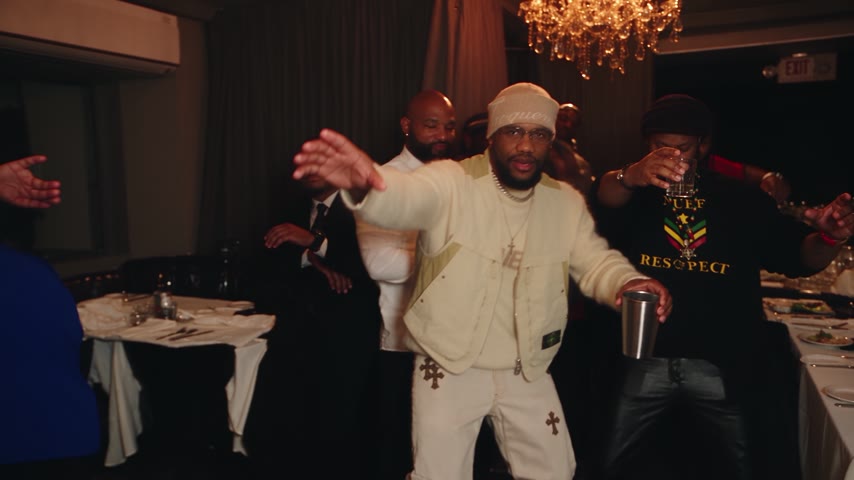
Use the Burning Bridges studio to place one adult portrait into the banquet scene. The preset supplies the movement and camera direction, so no prompt is needed.
Make your clip
- Select a clear, well-lit adult portrait with one person facing the camera. Avoid group shots, sunglasses and heavy filters.
- Review the free framing preview. It is a still image, not a generated video or a guarantee of the final appearance.
- Check the available format, resolution, credit cost and current reference duration in the studio.
- Sign in and buy a pack if needed. After sign-in, click the selected pack again to open checkout. Signing in alone does not start a purchase or generate a video.
- Return to the studio, confirm your choices and click Generate. Creation can take several minutes; timing varies.
- Follow progress in My videos. Download the finished MP4 and check the face, hands, movement and audio before sharing.
Improve a difficult result
A sharper front-facing photo and even lighting can help with facial detail. Keep the subject clearly visible and avoid cropped or obscured features. AI results can vary even with a good photo. Every new generation uses credits; check the cost before retrying.
You can edit a downloaded clip in a video editor for captions, trimming or permitted audio. Exporting at a larger size does not add detail that was absent from the original render.
Output settings and credits
Check the current reference duration in the studio before generating. Your output follows that reference, not the length of an example clip. Burning Bridges has an 18-second display example; it does not promise an 18-second generated video. Available portrait and landscape formats depend on the template.
| Resolution | Credits per clip | Access |
|---|---|---|
| 480p | 25 | Basic access |
| 720p HD | 50 | Basic access |
| 1080p Full HD | 100 | Unlocked by Trio or Party |
Check pricing packs: Single is $9.90 for 50 credits, Trio $24.90 for 150, and Party $59.90 for 400. These are one-time packs with no subscription, and pack credits never expire. That covers up to 2 / 6 / 16 clips at 480p, 1 / 3 / 8 at 720p, or 1 clip from Trio and 4 from Party at 1080p, before any mixed-resolution usage.
If a generation job fails, the credits charged for that job return to your account. This is different from a card refund, and a completed clip you dislike is not automatically a failed job. See the Refund Policy for billing help.
Photos and sharing permissions
Use your own adult photo or another adult with explicit written consent. Do not upload celebrities, public figures, minors or unauthorized third-party images. Pet and fictional-character examples do not establish support for those uploads or permission to use their likenesses.
A pack pays for video creation. It does not grant commercial rights to music, footage, characters or likenesses. Review your MP4 before posting, and add platform audio only where its license permits your use. TrendSwap is independent and is not endorsed by featured artists or rightsholders.
For more tips, check out our guide to the best Burning Bridges AI generators and Burning Bridges trend prompts & ideas. You can also explore our other viral templates like the Bulin 47 Freestyle and Topo Gigio celebration.
Burning Bridges Banquet AI Video
Take the lead role in the Drake chandelier banquet scene from one clear adult portrait.
Related Guides & Tutorials
Automate Viral TikTok AI Video Drops with Zapier
Step-by-step guide to connect TrendSwap with Zapier. Automatically generate viral meme video drops from new photos in Google Drive, Typeform, or webhooks.
TrendSwap Engineering
How to Compare Burning Bridges AI Generators
Compare preview quality, duration, resolution, cost per clip, rights and failed-job policies before buying a video pack.
TrendSwap Team
Burning Bridges AI Video: Photo and Caption Ideas
Photo and caption ideas for your own banquet clip, with clear limits on duration, likeness permission and commercial rights.
TrendSwap Team