How to Make the Bulin 47 AI Video (Effect + CapCut Tips)
 TrendSwap Team
Step-by-step: how to make the Bulin 47 AI video from one photo, what the TikTok "AI effect" really is, CapCut finishing tips and fixes for bad results.
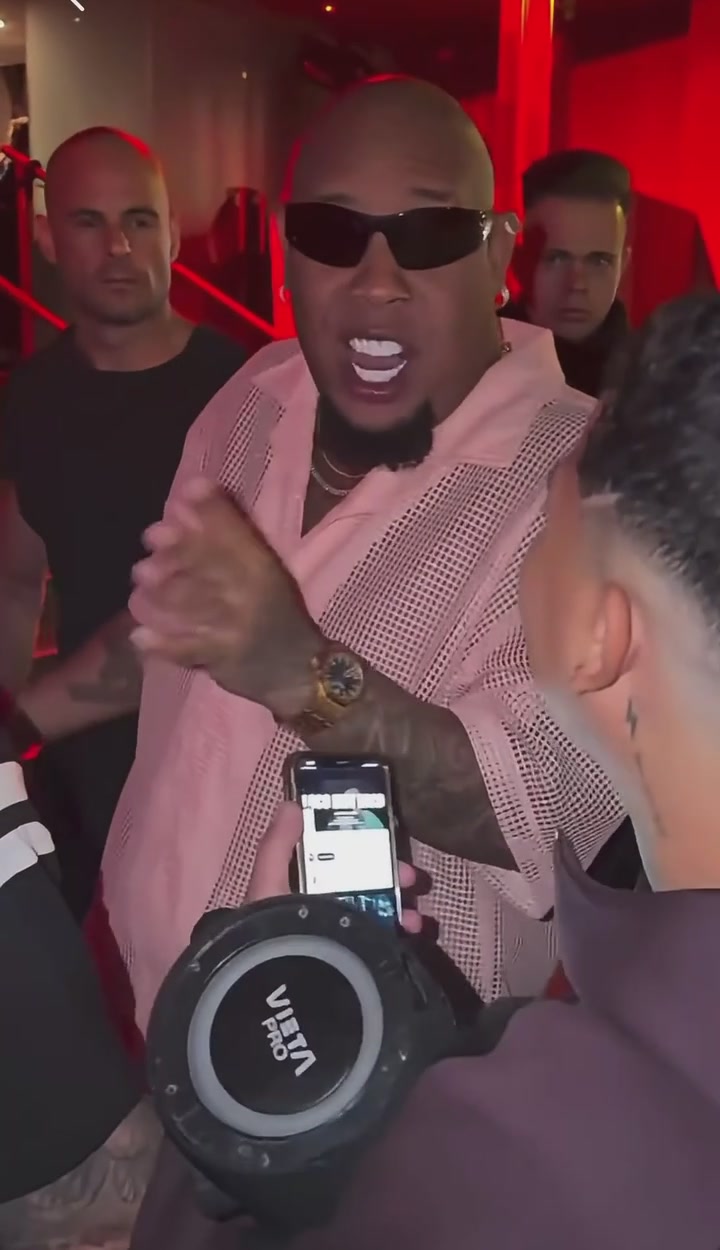
If you want to know how to make a Bulin 47 AI video, the short answer is: one clear photo, a motion template built from the freestyle, and the trending sound added when you post. This guide walks through each step, explains what people on TikTok mean by the "Bulin 47 AI effect," and shows how to finish your clip in CapCut.
Where the Bulin 47 Trend Came From
On October 2, 2026, Colombian creator Kevin Wai approached Dominican dembow artist Bulin 47 outside a restaurant in Spain, holding a portable speaker. Bulin dropped an improvised freestyle, finishing on the line "ya todos me conocen, soy Bulin 47," and backed it with a loose shoulder dance. Dominican outlet Listín Diario reported more than 50 million views across platforms within five days, and De Último Minuto put it above 60 million a day later.
The AI wave followed fast. Creators began animating their own photos and portraits into the performer's moves, and Google Trends shows searches for the artist's name peaking on October 10. That remix format is what this tutorial covers.
What Is the "Bulin 47 AI Effect"?
On TikTok, the top autocomplete suggestions are "bulin 47 ai effect," plus tutorial and CapCut variants. That wording suggests there is a one-tap filter inside TikTok or CapCut. As of October 12, 2026 we could not confirm an official in-app effect with that name. In practice, what people see is a motion-transfer video: an AI model takes a reference performance and re-renders it with a new person from a photo.
So if you have been scrolling the effects tab without luck, that is why. You need a tool that does photo-to-video motion transfer, then you post the result on TikTok with the sound.
What You Need Before You Start
- One photo of one person. Front-facing, eyes visible, chest-up or waist-up.
- Even light. Daylight beats a dim room; skip heavy beauty filters.
- Permission. Use your own photo, your pet, or a friend who said yes. Most tools, TrendSwap included, block celebrities and minors.
- A tool with a ready-made freestyle template, so you do not have to write prompts or find a reference clip yourself.
Step-by-Step Walkthrough
Step 1: Choose your photo
Pick a photo where your shoulders and hands are visible. The freestyle is mostly upper-body movement, so a tight face crop leaves the AI guessing. Avoid group shots; motion-transfer models usually follow the largest person in frame and can mix faces.
Step 2: Open a freestyle template
On the TrendSwap freestyle template page, the template is already set up with the moves and the handheld street camera feel. Our template uses an original recreation of the dance by our own performer, not the original footage.
Step 3: Upload and generate
Upload the photo, choose vertical 9:16 format (23 seconds, 720p HD), and press generate. Renders typically take 2 to 4 minutes. Pricing starts from $9.90 for a single pass (50 credits).
Step 4: Check the result
Watch the clip twice. Look at the face during head turns, the hands during the shoulder bounce, and any background text. If something looks off, see the fixes below before regenerating.
Step 5: Post with the trending sound
Download the MP4. In TikTok, tap the sound button, search for the Bulin 47 freestyle and pick the version with the most videos. Trim it so the line "soy Bulin 47" lands near your clip's best move. Using the in-app sound keeps your video on the trend page and avoids uploading the music file yourself.
Finishing Your Clip in CapCut
CapCut is useful after you generate, not instead of generating. A few quick edits that work well with the freestyle format:
- Add a hook caption. Something like "POV: you're the one with the mic" in the first second.
- Speed ramp the drop. Slow to 0.8x right before the shoulder bounce, then back to 1x.
- Before/after split. Put your original photo in the first half second, then cut to the video. This is the format most remix clips use.
- Export at 1080x1920. Then add the sound inside TikTok, not in CapCut, so the clip links to the trending audio.
CapCut search results mostly show templates that only add text and transitions over an existing clip. They cannot animate your portrait with the dance choreography, so you still need the generated video first.
Common Problems and Fixes
| Problem | Likely cause | Fix |
|---|---|---|
| Face changes during head turns | Side-angle or low-resolution photo | Use a sharp, front-facing photo |
| Extra or melted fingers | Hands hidden or cropped in the photo | Use a photo with hands visible or relaxed at your sides |
| Wrong person animated | Group photo | Crop to one person |
| Clothes look different | Outfit hidden by framing | Show your top clearly; it carries into the clip |
| Video has no sound | Silent export by design | Add the trending sound inside TikTok |
Is It Safe and Legal to Post?
Use people who agreed to it, and do not present the clip as the real artist. Some generators reportedly block prompts that mention the original clip for copyright reasons, so stick to tools that use their own reference motion. TrendSwap is not affiliated with Bulin 47 or Kevin Wai, and our export does not include the original audio or footage.
Ready to Try It?
Now you can make the clip without hunting for a filter that may not exist. Go to the Bulin 47 AI video generator, upload one photo and post it with the sound tonight while the Bulin 47 freestyle is still trending.
FAQ
Is there an official Bulin 47 AI effect on TikTok?
As of October 12, 2026 we could not confirm an official in-app effect. Most viral clips are made with photo-to-video AI tools and posted with the trending sound.
Can I make the video in CapCut?
CapCut can add captions, transitions and speed ramps, but its text templates cannot animate your portrait with the moves. Generate the video first, then edit in CapCut.
How long does it take?
With a ready-made template, approximately 2 to 4 minutes per render on TrendSwap.
Do I need to write a prompt?
Not with a template. Prompt-based tools work too, but you need a reference clip and more retries.
Can I use a photo of a celebrity?
We do not recommend it, and TrendSwap blocks it. Use yourself, a consenting friend or your pet.